


Hume Health
4.34.65K Reviews
App Specs
- Version
- 9.25.0
- Updated On
- License
- Free
- Downloads
- 1,000,000+
- Developer
- Hume Health Corp
- Categories
- Tools
- Platform
- Android
Screenshots
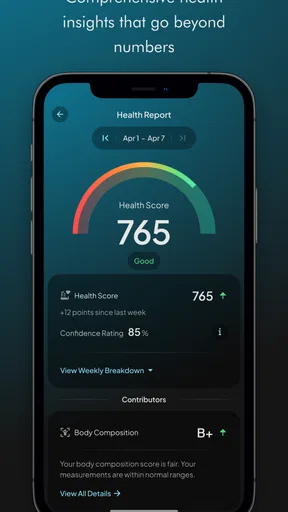
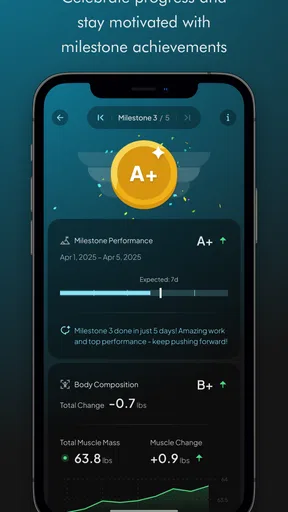
 Analysis by AppCompare
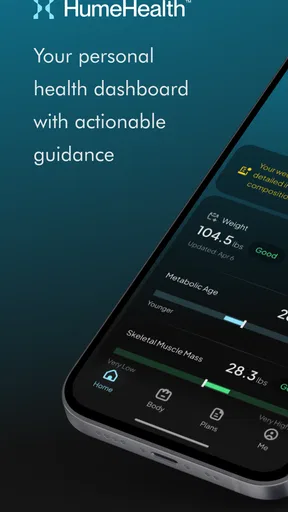
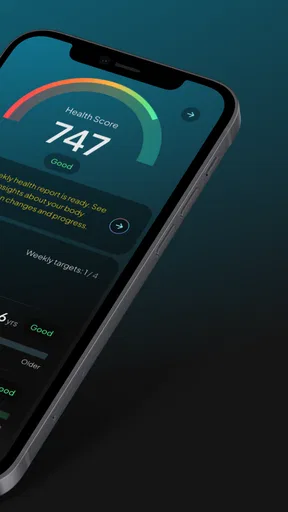
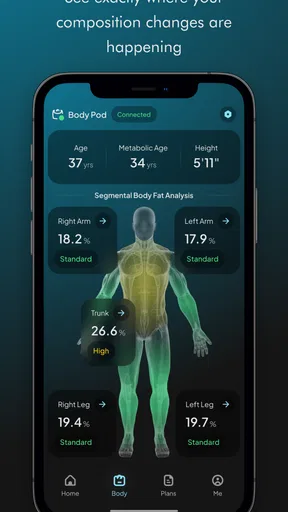
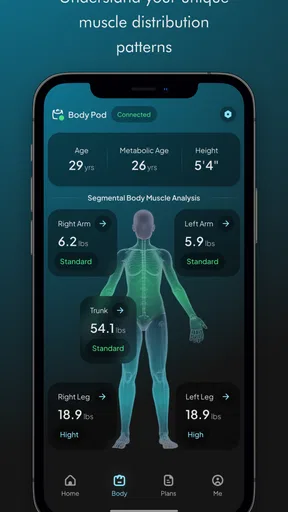
I found the most useful way to think about Hume Health is as a companion to Hume’s connected devices, rather than a standalone all-purpose wellness tracker. Its central job is to help you follow weight and longevity-related information alongside the Hume Band and Hume Body Pod. That focus can make a difference if you want a consistent record to look back on, but it also means the app is less compelling if you simply want a place to count steps without using its associated hardware.
That distinction matters before you download it. Plenty of general health apps are built around manual logging or data gathered from a phone and a watch; Hume Health is most relevant when you want your compatible Hume device to be part of the routine. I would treat it as the viewing and tracking side of that setup, not assume it will replace every fitness, nutrition, or medical tool you already use.
Why a long-term record can be more useful than a single weigh-in
Weight is easy to check and surprisingly easy to overinterpret. A single reading can shift for ordinary reasons, so I find a record more useful when it helps me notice a direction over time instead of making one morning feel like a verdict. Hume Health’s emphasis on tracking weight and longevity gives the app a more ongoing role: the value is in returning to it consistently and considering the broader pattern, not reacting to every change.
That does not make the app a clinician or turn its information into a diagnosis. I would use it as a personal tracking aid and bring health concerns to an appropriate professional. For someone managing a goal, a trend can help make progress easier to discuss and can provide context that memory alone often loses. For someone who finds weighing stressful, though, frequent checking may add pressure rather than clarity; it is reasonable to choose a calmer schedule or decide that this kind of tracking is not a good fit.
How I would make the device-and-app routine practical
In everyday use, the useful habit is not opening the app repeatedly to hunt for a perfect number. It is choosing a repeatable time, using the relevant Hume device as intended, and checking the record at a sensible interval. Keeping the routine similar makes comparisons more meaningful than taking readings at random times and trying to explain every fluctuation afterward.
A small but helpful approach is to pair a check-in with an existing habit, such as getting ready in the morning, rather than relying on motivation to remember later. I would also keep a brief note outside the measurement itself when a major routine change could affect how I interpret the trend. The point is not to create a second diary; it is to avoid treating a number without context as the whole story.
If the device is not nearby, the practical question is whether you can still get the value you want from the app that day. Since its role centers on the Band and Body Pod, I would not choose it on the assumption that it independently provides every measurement. Before building a routine around it, make sure the Hume hardware is part of your plan and that the way you expect to use it matches the app’s companion role.
Worth Reading Before You Choose

EA SPORTS FC Mobile 26 Is a Bigger Football Game, but It Takes Time

Flipboard Shows What News Apps Must Do Beyond the Feed

Switching to Android Auto Means Rethinking Your Driving Routine

Google Calendar Makes a Crowded Week Easier to Manage

Ludo King Makes the Most of the Minutes Between Plans

Baby Panda World Brings Quick Play to Modern Phones, but Its Game Library Feels Busy
A realistic use case—and the trade-off behind it
Imagine you are trying to establish a steadier health routine while juggling work and family. You could use a regular check-in to keep a record, then review the direction over several weeks instead of letting one result dictate whether the week feels successful. That is a modest but realistic benefit: the app can make a recurring task easier to revisit, while the actual decisions still come from your goals, circumstances, and, where needed, professional guidance.
The trade-off is dependence on a connected-device routine. A phone-only tracker may be more convenient if you want basic activity information and already use another health platform. A paper log may be better if you prefer not to make personal measurements part of your screen time. Hume Health makes more sense when the Hume Band or Body Pod is already relevant to you and you want a digital companion for that use, rather than when you are looking for a universal health dashboard.
There is also a useful boundary to keep in mind: tracking can support consistency, but it cannot guarantee that a goal is appropriate or that a trend has one simple explanation. I would avoid changing diet, exercise, or treatment based only on an app reading. The strongest use is as a prompt for reflection and, if something worries you, a starting point for a more informed conversation.
First Impressions and Getting Started
When I first downloaded Hume Health, I was immediately struck by its clean and user-friendly interface. It’s not cluttered with unnecessary features, which is a huge plus in my book. Signing up was a breeze, and in no time, I was poking around, figuring out what this app could do for me.
Features That Stand Out
Alright, let’s talk features. What I love about Hume Health is how it integrates various aspects of health into one place. Whether it’s tracking your diet, exercise, or even your mental well-being, it’s all here. You can log meals with a simple tap and get nutritional insights, which is super helpful if you’re trying to eat healthier but don’t want to spend hours meal planning.
The exercise tracker is pretty nifty too. It syncs with various wearables, so if you’re like me and have a smartwatch glued to your wrist, it’ll automatically log your steps, workouts, and even your heart rate. No more manual input, thank you very much!
Mindfulness and Mental Health
Now, let’s not forget about mental health. Hume Health doesn’t just focus on the physical; it’s got a mindfulness section that’s worth checking out. There are guided meditations and breathing exercises to help you unwind after a long day. I found myself using these more often than I expected, especially those quick 5-minute meditations that fit perfectly into a busy schedule.
Community and Coaching
One of the more unique features is the community aspect. You can join groups or forums within the app to share tips, challenges, and even recipes. It’s like having a support group at your fingertips. Plus, if you’re someone who appreciates a little extra guidance, the app offers virtual coaching. You can set goals and get personalized advice to stay on track.
What’s really cool is how the app learns from your data. Over time, it starts to give you more personalized suggestions, whether it’s recommending new workouts or suggesting dietary changes based on your logged meals. It's like having a personal health assistant right in your pocket.
Final Thoughts
So, is Hume Health worth it? Honestly, I was pleasantly surprised by how comprehensive it is. It’s not just another fitness app; it’s a holistic health companion. Whether you’re a health nut or someone just starting to dip a toe into the wellness pool, this app offers something valuable.
To wrap it up, if you’re looking for a way to streamline your health journey, give Hume Health a shot. It’s intuitive, versatile, and genuinely helpful. After all, who doesn’t want a bit more health and happiness in their life, right?
Who is most likely to benefit
Hume Health is a better match for someone who already owns, or is seriously considering, a Hume Band or Hume Body Pod and wants a place to follow the information those devices support. Hume Health Corp develops the app, which sits in the tools category. Its audience is broad in age terms, but the practical fit is narrower: you need an interest in regular tracking and a willingness to make the connected device part of your routine.
I would be less inclined to recommend it to a person who wants a free, phone-only step counter, a meal planner as the main feature, or an app that works as a full substitute for specialist medical care. The app itself is free to download, but in-app purchases range from $9.99 to $109.99 per item, so I would look carefully at what any paid option offers before committing. The download cost alone does not tell you what the complete device-and-app setup will cost.
It has an average rating of 3.9 from around 16,000 ratings, alongside about 3,400 written reviews, and has passed 500,000 installs. I read that as evidence that it has a meaningful audience, not proof that it will suit every tracking style. The rating is a useful prompt to set realistic expectations: decide what you need it to do, then judge it against that specific job rather than expecting a broad health app to solve everything.
Questions worth settling before you build a habit
If you are wondering whether you need Hume hardware, I would plan on using the app as a companion to the Band or Body Pod, rather than choosing it for an independent phone-only measurement routine. If your main goal is simply to keep a basic activity log, the health tools already built into a phone or wearable may be the simpler option. If you want to follow information connected to Hume’s devices, the companion approach is the reason to consider it.
Another practical question is whether you have to check it every day. I would not make daily attention the measure of success. A cadence you can sustain is more useful than a burst of frequent checking that becomes tiring. If regular measurements affect your mood or encourage unhelpful comparisons, step back and reconsider whether this style of tracking serves you; an app should support a routine, not become a source of pressure.
For someone already using another health app, the decision is less about replacing everything and more about whether Hume’s device-related record fills a gap. Keeping separate tools can be sensible when each has a clear job, but duplicating the same tracking across several apps may create extra maintenance without better decisions. I would start with one purpose for Hume Health, use it consistently for that purpose, and only add more complexity if it genuinely helps.
Compatibility, cost, and a measured recommendation
The app was released on September 30, 2019, and its current version is 9.14.1. It supports Android 8.0 and later, so it is worth checking your device’s operating system before downloading. It is rated for Everyone. Those details make it straightforward to assess basic compatibility, while the more important decision remains whether you want the associated Hume devices and the kind of routine they enable.
My recommendation is conditional rather than universal. If a connected Hume device is already part of your health setup, a companion app can make it easier to keep returning to your records and reflect on a longer pattern. If you are only looking for a general-purpose tracker, I would compare it with the simpler tools you already have before adding another app or paying for related options. The best result comes from treating the information as context, not a verdict.
Overall, I see Hume Health as a focused choice for people who want their Hume device and their tracking habit to work together. It is not the right fit for every wellness goal, and it should not be mistaken for personalized medical judgment. But for a person who values a consistent record, understands the role of the hardware, and can use the information without obsessing over each reading, it can be a practical part of an everyday health routine.
Pros
- User-friendly interface for easy navigation.
- Comprehensive health tracking features.
- Customizable health goals and reminders.
- Integrates with popular fitness devices.
- Offers personalized health insights.
Cons
- Limited free version features.
- Occasional sync issues with devices.
- In-app ads can be intrusive.
- Requires consistent internet connection.
- Subscription needed for premium features.
FAQs for Hume Health
What features does Hume Health offer for managing my wellness?
Hume Health provides a comprehensive suite of features designed to enhance your wellness journey. These include personalized health assessments, goal tracking, and tailored recommendations. The app integrates seamlessly with various fitness devices to monitor your activity levels and offers mindfulness exercises to support mental well-being. Additionally, users can access a library of wellness resources.
Is Hume Health compatible with my smartphone and wearable devices?
Hume Health is compatible with both Android and iOS devices, ensuring a wide range of users can benefit from its features. The app also supports integration with popular wearable devices such as Fitbit, Apple Watch, and Garmin, allowing you to sync your health data effortlessly. Make sure your device meets the minimum operating requirements for the best experience.
How does Hume Health protect my personal data and privacy?
Hume Health prioritizes user privacy and data protection with robust security measures. The app employs end-to-end encryption for all data transactions and complies with global privacy regulations like GDPR and CCPA. Users have control over their data and can choose what information to share, ensuring a secure and private wellness experience.
Can I use Hume Health to connect with healthcare professionals?
Yes, Hume Health offers features that allow users to connect with healthcare professionals. Through the app, you can schedule virtual consultations, receive expert advice, and share your health data with your doctor securely. This feature ensures that users can receive tailored healthcare support directly from trusted professionals.
Is there a subscription fee for using Hume Health, and what does it include?
Hume Health offers both free and premium subscription plans. The free version provides basic wellness tools, while the premium subscription unlocks advanced features such as personalized coaching, detailed analytics, and exclusive wellness content. The premium plan ensures a more tailored and in-depth health management experience, with regular updates and new features.


